For people with hearing loss who already own AirPods, Apple's accessibility features are a legitimate first step. The Hearing Aid feature (iOS 18.1+) on AirPods Pro 2 is FDA-cleared for mild to moderate loss. Live Listen and Conversation Boost are real tools that work in specific moments. They have real limits.
This article cuts through the hype. If you're comparing AirPods to hearing aids or wondering whether Apple's features are "enough," here's what audiologists, real users, and the data show.
What Apple Earbud Features Help with Hearing
Apple offers three hearing-related features across its AirPods lineup. Each solves a different moment.
Live Listen (all AirPods models, iOS 14.3+): Your iPhone acts as a microphone. Place your phone on a table in front of someone speaking, and the sound streams to your AirPods. It's basic amplification through your phone's mic. Best for lectures, one-on-one conversations when the speaker is in front of you. Requires holding your phone out or placing it strategically.
Conversation Boost (AirPods Pro 2, iOS 17.1+): A directional feature that focuses on sound from the person in front of you and reduces noise from the sides and back. Works when your AirPods are in Transparency mode. Helps in restaurants, coffee shops, moderately noisy settings. Does not amplify the wearer's own hearing across all frequencies.
Hearing Aid Feature (AirPods Pro 2, iOS 18.1+): FDA-cleared, software-only. After you take a 5-minute hearing test on your iPhone, the feature personalizes amplification for mild to moderate loss. Users adjust overall volume, tone, and noise reduction. Equivalent to self-fit, clinic-free hearing aid setup.
What Each Feature Does Well
Live Listen works for occasional lectures. If you attend a talk, a church service, or a classroom once a month, Live Listen is genuinely helpful. Place your iPhone on the podium or in front of the speaker, and you get clean amplified sound without wearing a hearing device. Apple's research shows it improves speech intelligibility in quiet to moderately noisy settings when you can position your phone.
Conversation Boost shines at dinner. Restaurants, coffee shops, and small group dinners are Conversation Boost's intended use case. By beamforming toward the speaker in front of you and reducing side noise, it does help users with mild hearing loss follow conversations more easily than Transparency mode alone. Independent lab testing found it provides real signal-to-noise improvements in moderately noisy environments.
Hearing Aid Feature meets FDA standards for mild loss. After users take the clinically validated hearing test, the feature uses an algorithm called frequency-matching (same principle used in prescription aids) to target the frequencies the user struggles with. Users report speech clarity improves "notably" when the settings are tuned correctly. It's self-fit, no clinic visit, no wait.
What Each Feature Doesn't Do
Battery kills all-day use. AirPods Pro 2 deliver 6 hours per charge in Hearing Aid mode (down from their music-listening battery life). The charging case adds about 24 more hours of total listening. Compare that to Panda Air's 60-hour total battery on a single overnight charge - you wear them for a week straight. If you put AirPods in at breakfast, they'll die by late afternoon. Power users must charge mid-day or carry a second pair. That's not "all-day hearing"; that's situational support.
Fit and comfort vary wildly. AirPods rely on a one-size-mostly-fits-all design with silicone tips. Hearing aid users wear devices 8-10 hours daily and need a stable fit. AirPods shift, fall out, and create an "occlusion effect" (a hollow, boomy sound in your own voice). Real hearing aids are fitted to your ear shape. Reviews on hearing forums show users constantly adjusting fit and struggling with unexpected amplified sounds - water running, paper crinkling, mechanical noise.
Speech-in-noise testing shows mediocre performance. Independent lab testing (HEAR Advisor, Hearing Review) rated AirPods Pro 2's Hearing Aid feature at a B or C grade for clarity in complex environments. Lab scores place them in the bottom 50% of devices tested. Most real hearing aids score A or B because they use 12-16 frequency channels with adaptive processing. AirPods don't isolate speech from background noise the way clinical devices do.
Social perception still matters. An AirPod in your ear looks like you're taking a call or listening to music - that's intentional design. If someone approaches to talk, they won't know you're using a hearing aid. Many users report it creates social confusion: "Am I talking to someone who's actually listening, or are they on a call?" Hearing aid stigma is real, but so is the ambiguity of AirPods in public.
When AirPods Are Enough
AirPods work best for users with mild hearing loss who have specific, limited moments where they need support. If you already own AirPods, you're in the Apple ecosystem, and you use hearing support situationally (a weekly dinner, occasional lectures, video calls), the Hearing Aid feature solves that narrow problem. The self-fit hearing test is fast and reasonably accurate. Conversation Boost does help in noisy restaurants. Live Listen is genuinely useful for one-off events.
If you're not an Apple user or you need hearing support for 4+ hours daily, stop here and skip to the next section.
When You've Outgrown AirPods
You're wearing AirPods 8+ hours daily. After a full work day plus evening, battery becomes a real problem. Hearing aids are meant to stay in your ear all day. AirPods require charging mid-afternoon or rotating pairs. That friction adds up.
You're missing speech in noise. If dinner at restaurants or meetings in open offices leave you straining to catch words, Conversation Boost and Live Listen aren't enough. You need frequency-specific amplification and multiband noise reduction - the work that real hearing aids do. Lab testing shows AirPods fall short here.
You're adjusting AirPods constantly. If you're constantly reinserting them, changing fit, or tweaking noise reduction settings throughout the day, the device isn't meeting your comfort needs. Hearing aids stay put and work the same way all day.
Social perception is starting to matter. If you care whether people know you're wearing a hearing device, AirPods seem like a win. But after months of use, it matters less. You own your hearing loss; most people don't judge. And unlike AirPods, actual hearing aids look and feel designed for the job, not like earbuds for music.
What to Step Up To: Panda Air
If AirPods have shown you what hearing support feels like but you've hit their limits, the natural upgrade is an earbud-style hearing aid built for the job. Panda Air ($299, was $399 - save $100) is engineered specifically for all-day hearing.
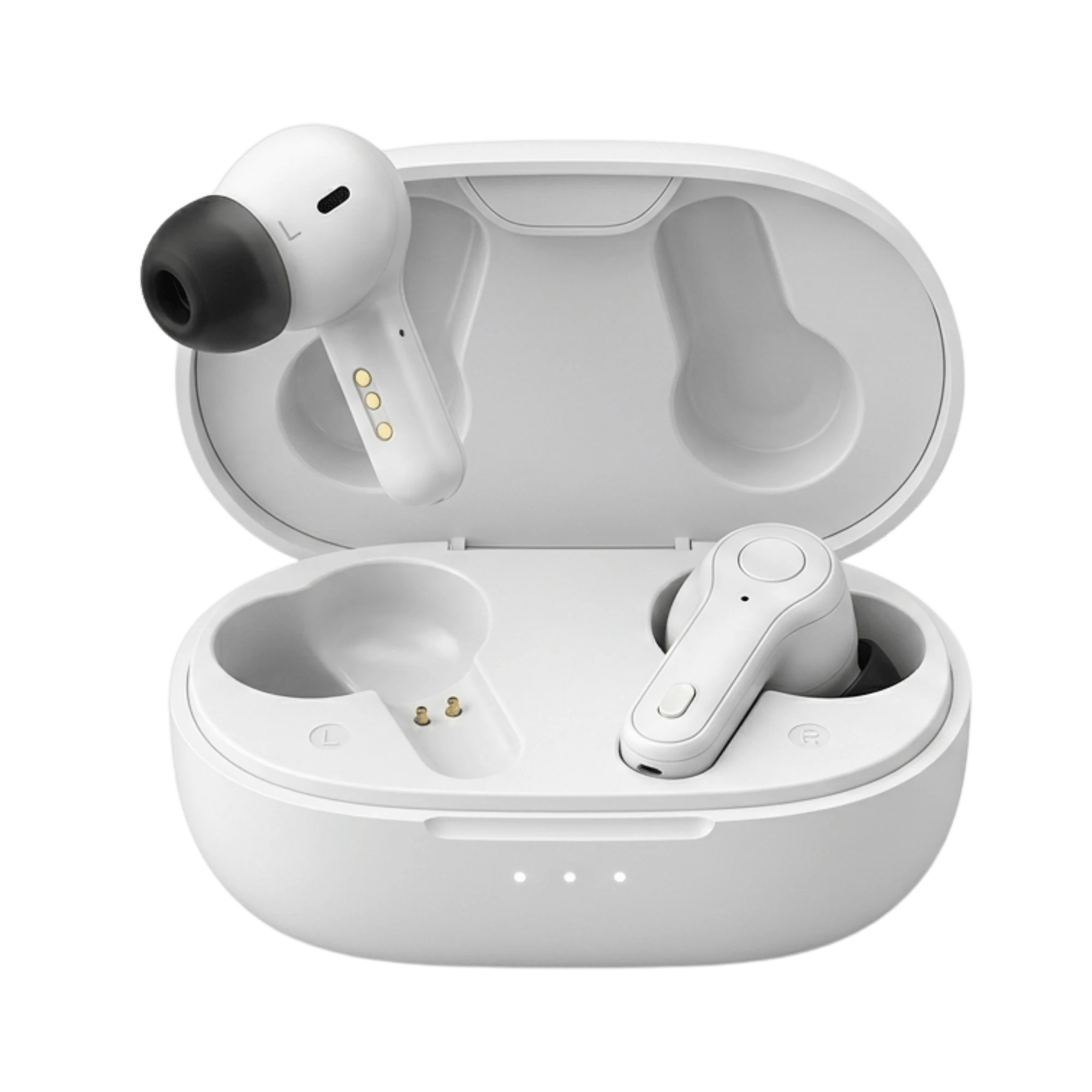
Battery is 10x longer: AirPods Pro 2 give 6 hours in Hearing Aid mode. Panda Air gives 10 hours per charge, and the fast-charge case holds 60 hours total. Wear them Monday through Friday without touching the charger. That shifts hearing loss from "something you manage" back to "something you just wear."
Amplification is clinically tuned: Panda Air uses 16-channel WDRC (Wide Dynamic Range Compression) with multi-band adaptive noise reduction. AirPods don't publish their channel count; independent testing places them well below this. Panda's frequency-matching system, same as Panda Quantum's prescription-grade approach, isolates the exact frequencies you struggle with and corrects them - not a broad "louder" setting.
Price is nearly the same: AirPods Pro 2 cost $249. Panda Air costs $299 (on sale from $399). For $50 more, you get a device engineered for hearing, not music listening. That's not premium pricing; that's engineering clarity.
Warranty and support matter: AirPods Pro 2 carry a 1-year limited warranty. Panda Air includes a 5-year warranty and 45-day risk-free trial. If they don't work for you, you get your money back. Panda isn't betting on the device; it's betting on your hearing.
Other Modern Earbud-Style Hearing Aids
If you want to compare beyond Apple and Panda, the landscape is small. Sony CRE-C20 ($999) offers a more boutique earbud look but costs 3x more and has limited clinical tuning. Jabra Enhance Plus ($1,195) is professional-grade and more feature-rich, but the price and learning curve suit users ready to commit to traditional hearing aids that happen to be wireless. Eargo Link ($1,490) is invisible and expensive. For the balance of price, battery, and hearing science, Panda Air sits alone.
Bottom Line: AirPods Pro 2 are a legit starter if you're in the Apple ecosystem and have mild, situational hearing loss. The Hearing Aid feature is FDA-cleared, the self-fit is fast, and Conversation Boost does work in restaurants. But if you're wearing them more than 6 hours a day, missing speech in noise, or tired of constant recharging, Panda Air is engineered for the job. $299 instead of $249 for 10x the battery, 16-channel frequency-matched amplification, and 5-year support. That's the upgrade worth making.
FAQ: AirPods vs Real Hearing Aids
Can AirPods actually replace hearing aids?
No. AirPods work for mild loss in specific moments - a dinner, a lecture, a video call. Hearing aids like Panda Air are engineered for all-day wear: better battery, stable fit, multiband noise reduction, and frequency-specific amplification. AirPods are a taster; hearing aids are the solution.
How much longer is Panda Air's battery vs AirPods?
AirPods Pro 2 last 6 hours per charge in Hearing Aid mode. Panda Air lasts 10 hours per charge, with a total of 60 hours from the case. That means you wear Panda Air from Monday through Friday without charging. AirPods need a charge mid-afternoon if you use them all day.
Do I need an iPhone to use AirPods' hearing features?
Yes. The Hearing Aid feature requires iOS 18.1 or later and the AirPods must be paired to your iPhone. Panda Air works with an iPhone or Android; you don't need a smartphone at all if you prefer a simpler device.
Can I try Panda Air risk-free?
Yes. Panda Air includes a 45-day money-back trial. If you wear them for 6 weeks and they don't work for your hearing, you get your full money back. AirPods don't offer this - once you set up the Hearing Aid feature, you're committed.
The Clearer Choice
AirPods Pro 2's Hearing Aid feature is a breakthrough for situational hearing support - FDA-cleared, easy to set up, and genuinely helpful if you're already in the Apple ecosystem. But if you're wearing hearing support more than a few hours a day, missing words in noise, or tired of mid-day charging, you've outgrown what AirPods can do. Panda Air is built for the job: 60 hours of battery per week, 16-channel frequency-matched clarity, and a 5-year promise that your hearing matters. For only $50 more than AirPods Pro 2, it's the natural upgrade for users who've realized hearing loss isn't situational - it's everyday.
Start with AirPods if you're curious. Move to Panda Air hearing aids when you're ready to hear clearly all day. Take the free hearing test on our website, and see how personalized frequency-matched amplification feels. That's the best hearing aid for everyday life.